


Songsterr Guitar Tabs & Chords
4.26.74K Reviews
App Specs
- Version
- 6.5.43
- Updated On
- License
- Free
- Downloads
- 5,000,000+
- Developer
- Songsterr
- Categories
- Music & Audio
- Platform
- Android, iOS
Screenshots
 Analysis by AppCompare
When I want to learn a song, I often need more than a static chord sheet: I want to see how the parts move and hear how they fit together. That is where Songsterr Guitar Tabs & Chords makes sense to me. It is a music and audio app from Songsterr, built around tab reading and an interactive player, so it suits focused practice more than casual music listening.
How quickly it gets me to practice
The useful question for an app like this is not whether every screen feels instant, but whether I can get from a song idea to a workable practice session without unnecessary fuss. Songsterr’s central task is clear: find a tab, read the part, and follow playback. That direct focus is welcome when I have only a few minutes before work or want to check a riff while holding my instrument.
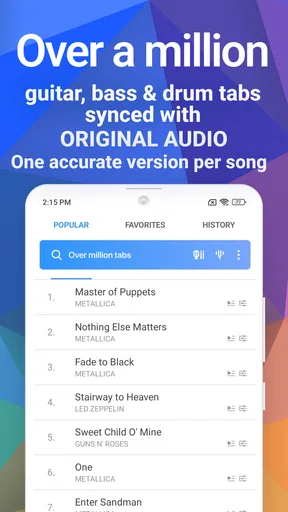
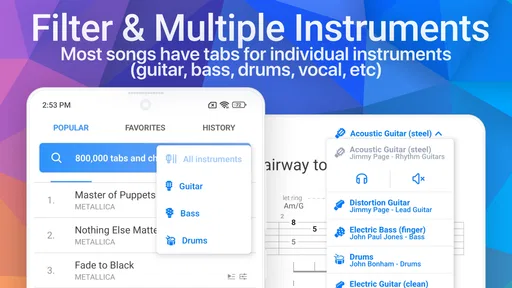
Its catalogue covers guitar, bass, and drums, which makes it more flexible than a guitar-only reference. The app has been around since Jan 23, 2012, and its current version is 6.4.23. I would not treat those details as a promise that every device will behave identically; responsiveness depends on the phone or tablet and the task. Still, a purpose-built tab player has a practical advantage over searching through unrelated video results: the notation and playback are presented as parts of the same activity.
Where the interactive player earns its place
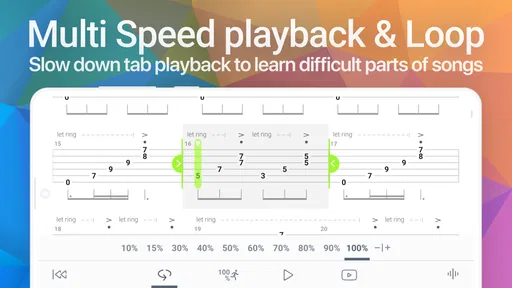
The player is most useful when I already know what I am trying to fix. I can use slower playback to inspect a quick passage, then return toward normal speed once my hands understand the shape. Looping a short section is especially useful for a transition: instead of restarting a whole song every time, I can keep attention on the awkward few beats. That makes practice more deliberate, though it does not replace listening closely or working out fingering that feels comfortable for my own hands.
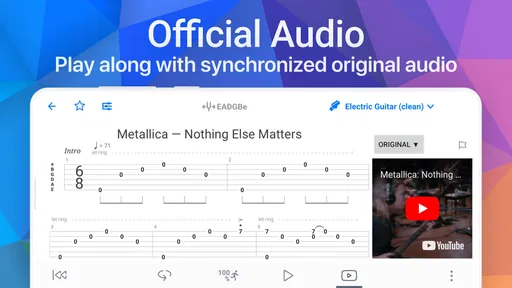
Synced highlighting also helps me keep my place as the tab moves. I find it particularly helpful when a part has repeated phrases or when I am switching between looking at the screen and watching my fretting hand. A practical routine is to listen once without playing, follow the tab on the next pass, and only then pick up the instrument. That small pause can reveal whether I am struggling with the rhythm or simply losing my place on the page.
Using it in a real practice routine
Picture a short evening session: I have picked a song to learn, but one change in the guitar part keeps tripping me up. I can locate the relevant passage, slow it down, and repeat it until the movement feels less foreign. After that, I can play along at a more natural pace and see whether I can stay with the arrangement. This is a more useful way to spend ten spare minutes than repeatedly attempting the full song from the beginning.
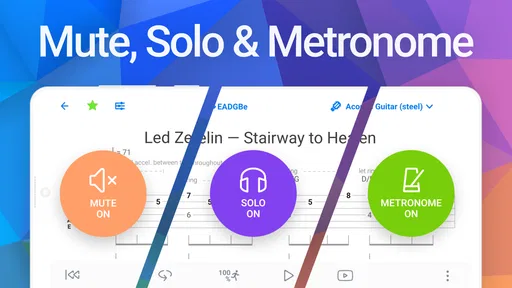
The same approach works for bassists who want to isolate a line, or drummers who need to follow a part while listening for how it sits against the rest. It is not a complete lesson plan: it does not teach music theory simply by displaying a tab. I would pair it with a metronome or a teacher when I need structured timing work, technique feedback, or an explanation of why a passage is written that way.
Worth Reading Before You Choose

Flipboard Shows What News Apps Must Do Beyond the Feed

Switching to Android Auto Means Rethinking Your Driving Routine

Google Calendar Makes a Crowded Week Easier to Manage

Ludo King Makes the Most of the Minutes Between Plans

Baby Panda World Brings Quick Play to Modern Phones, but Its Game Library Feels Busy

ESPN’s Live Game View Makes Following Close Games Easier
Screen comfort, offline use, and small trade-offs
Font-size adjustment is a useful detail when I am reading from a phone placed beside an amp or music stand. Dark mode can also make a longer practice session easier on the eyes in a dim room. These options do not change the music, but they reduce the little annoyances that can interrupt concentration. On a small screen, though, enlarging notation may mean more scrolling, so I would adjust the view before starting rather than in the middle of a difficult passage.
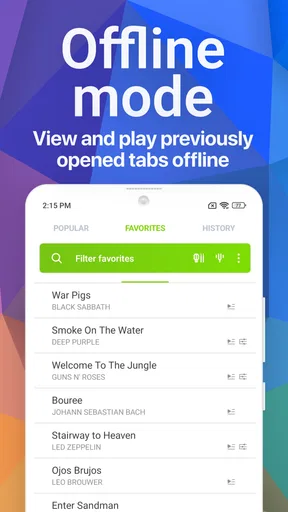
Offline access can help when I expect to practise somewhere with unreliable connectivity. The sensible workflow is to prepare the songs I plan to use while online, then check that they are available before leaving. I would not assume that every item or every action is available offline; the practical point is to avoid making a trip or rehearsal depend on a last-minute search. For a session at home with steady internet, that preparation may not matter at all.
Reliability during longer sessions
For me, reliability means being able to keep a practice session moving: playback should remain understandable, the current position should be easy to follow, and returning to a passage should not turn into a chore. The synced display and looping workflow support that kind of continuity. I would still keep the screen awake and the phone positioned where I can see it, since an interactive score is only helpful if I can glance at it comfortably while playing.
When something feels out of step, I would first check whether I have selected the right instrument part and whether the passage itself is the one I meant to practise. Tab arrangements can be dense, and following another instrument’s line by mistake can look like a playback problem. For important practice away from home, I would also prepare the material in advance rather than rely on searching, loading, and adjusting everything at the last moment.
Who will get the most from it
I think Songsterr is a strong fit for players who can already read basic tab and want a practical way to work through songs. Beginners can benefit from seeing notes move in time, but they may need outside help with rhythm notation, tuning, technique, and the meaning of unfamiliar symbols. More experienced players may value it as a quick reference for checking a part or learning material on another instrument, rather than as a replacement for their own ear.
It is less suitable if what you want is a guided course with progressive lessons, personal feedback, or a full video demonstration of hand position. A video tutorial can show posture and finger movement more clearly; a plain tab site may be quicker if all you need is a fixed page to print or glance at. Songsterr sits between those choices: it adds playback and following cues to tab reading, but the player still has to make musical decisions and practise the physical technique.
The app is free to start, with in-app purchases listed at $9.99 per item. I would try the free experience with a few songs I genuinely want to learn before paying for anything. That gives me a better sense of whether the available access and tools match my routine. Its 4.2 average rating from around 58,000 ratings, alongside more than 5 million installs, suggests that many people use it, but popularity alone cannot tell me whether a particular arrangement or workflow will suit me.
First Impressions
Right off the bat, Songsterr Guitar Tabs & Chords impresses with its sleek and intuitive interface. No more squinting at blurry tabs or dealing with overwhelming clutter. It’s designed to be user-friendly, which is a huge plus if you’re like me and want to dive right into playing. The app is available for both Android and iOS, making it accessible no matter what device you’re rocking.
What’s Inside?
The app’s library gives me plenty to explore across different genres and instruments. That breadth is useful when I want to compare how guitar, bass, and drum parts contribute to a song, or when a friend asks me to help work out a track outside my usual style. The range is a real strength, although I still check that the particular arrangement suits what I am trying to play instead of assuming every tab will match my preferred version.
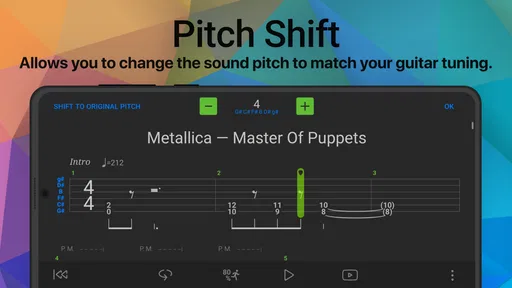
One of the standout features is the ability to slow down tracks without altering the pitch. This is a game-changer for practicing tricky solos or complex chord progressions. You can loop specific sections, which is super helpful when you need to drill down on a particular part of the song.
Interactive Learning
What really sets Songsterr apart is its interactive features. You’re not just reading tabs; you’re engaging with them. The app allows you to play along with the tabs, and there’s even a multi-speed playback option. It’s like having a personal guitar tutor in your pocket!
The synced playback feature is a godsend. As you play along, the app highlights the notes, making it easier to keep track. This is especially helpful if you’re prone to losing your place (guilty as charged).
Customization and User Experience
Customization options abound. You can adjust the font size of the tabs, which is perfect for those late-night sessions when your eyes are tired but your fingers are eager. The dark mode is another feature I’ve come to love, sparing my eyes from the blinding white light.
The app’s offline mode deserves a special mention. Whether you’re jamming in the park or at a cabin in the woods, you’ll have your tabs handy without needing an internet connection. Just download your favorite tracks beforehand, and you’re good to go.
Community and Support
Songsterr has a vibrant community. Users can contribute tabs, adding to the ever-growing library. This community-driven approach means that the collection is always expanding with fresh content. Plus, the app’s support team is responsive, which is reassuring if you run into any technical hitches.
Pricing
Now, let’s talk dollars and cents. The free version of the app offers plenty, but if you’re serious about your guitar journey, the premium features are worth considering. For a small subscription fee, you unlock full access to all songs and additional features like playback and print options.
In my opinion, the premium version is a worthy investment if you’re committed to improving your guitar skills. The ability to slow down, loop, and print tabs elevates your practice sessions to professional levels.
Final Thoughts
In a nutshell, Songsterr Guitar Tabs & Chords is a must-have for any guitarist, whether you’re a beginner or a seasoned pro. It combines a broad library, interactive features, and a user-friendly design to make learning the guitar a delight rather than a chore. It’s not just an app; it’s your personal music partner.
If you’re serious about taking your guitar skills to the next level, give Songsterr a try and let the music play on!
Pros
- Vast library of songs and tabs.
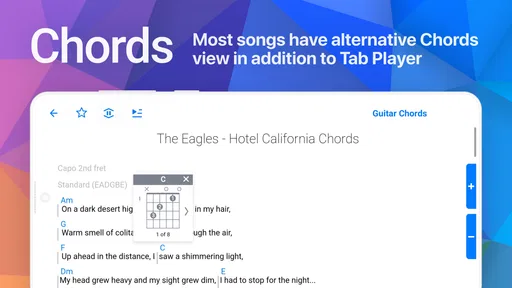
- Accurate and detailed chord diagrams.
- Offline access available.
- Interactive playback with speed control.
- Syncs across multiple devices.
Cons
- Limited free features.
- Subscription required for full access.
- No option to create custom tabs.
- Ads can be intrusive in free version.
- Some songs lack complete tabs.
FAQs for Songsterr Guitar Tabs & Chords
What features does Songsterr Guitar Tabs & Chords offer?
Songsterr Guitar Tabs & Chords offers a comprehensive library of over 500,000 tabs for guitar, bass, and drums. It includes interactive playback, allowing users to listen to the tabs as they learn. The app also provides tools like tempo control, looping, and a solo mode to isolate instruments for easier learning.
Is Songsterr Guitar Tabs & Chords suitable for beginners?
Yes, Songsterr is beginner-friendly. It provides tabs with accurate chords and easy-to-follow playback, which helps new learners understand timing and rhythm. The interactive features support gradual learning, making it easier for beginners to grasp complex songs at their own pace.
Does Songsterr require an internet connection to use?
Songsterr requires an internet connection for browsing and streaming tabs from its extensive library. However, users can save tabs for offline use, allowing them to practice without needing continuous internet access. This feature is particularly useful when practicing on the go.
Is there a cost to use Songsterr Guitar Tabs & Chords?
Songsterr offers a free version with basic features. However, for enhanced features like full access to all tabs, printing capabilities, and additional playback options, users can opt for a subscription. The app provides a free trial period so users can explore premium features before committing.
Can I use Songsterr Guitar Tabs & Chords on both Android and iOS?
Yes, Songsterr is available on both Android and iOS platforms. The app is optimized for mobile use, providing a seamless experience across different devices. Users can download it from the Google Play Store or Apple App Store, ensuring access to its features regardless of their device type.


